Email is one of the most important tools for staying connected with customers, colleagues, friends, and family. That's why Doteasy is introducing Titan Email - a modern email platform designed to provide a faster, more intuitive experience while giving you the tools you need to manage your communications securely and efficiently.
Whether you prefer accessing your inbox through a web browser, Outlook, Apple Mail, Thunderbird, or a mobile device, Titan gives you the flexibility to work the way you want.
This guide walks you through the key features of Titan Email, explains how to manage your email accounts, and shows you how to get the most out of your new email service.
What is Titan Email?
Titan is a professional email platform built for individuals and businesses looking for a reliable, secure, and easy-to-use email experience.
With Titan, you can:
- Access your email from any web browser
- Use your favorite desktop or mobile email applications
- Organize messages with folders and search tools
- Manage multiple email accounts
- Protect your account with Two-Factor Authentication (2FA)
- Improve email deliverability using DKIM authentication
Whether you're checking your inbox throughout the day or managing multiple business email accounts, Titan provides a clean and responsive interface designed to help you stay productive.
Accessing Titan Webmail
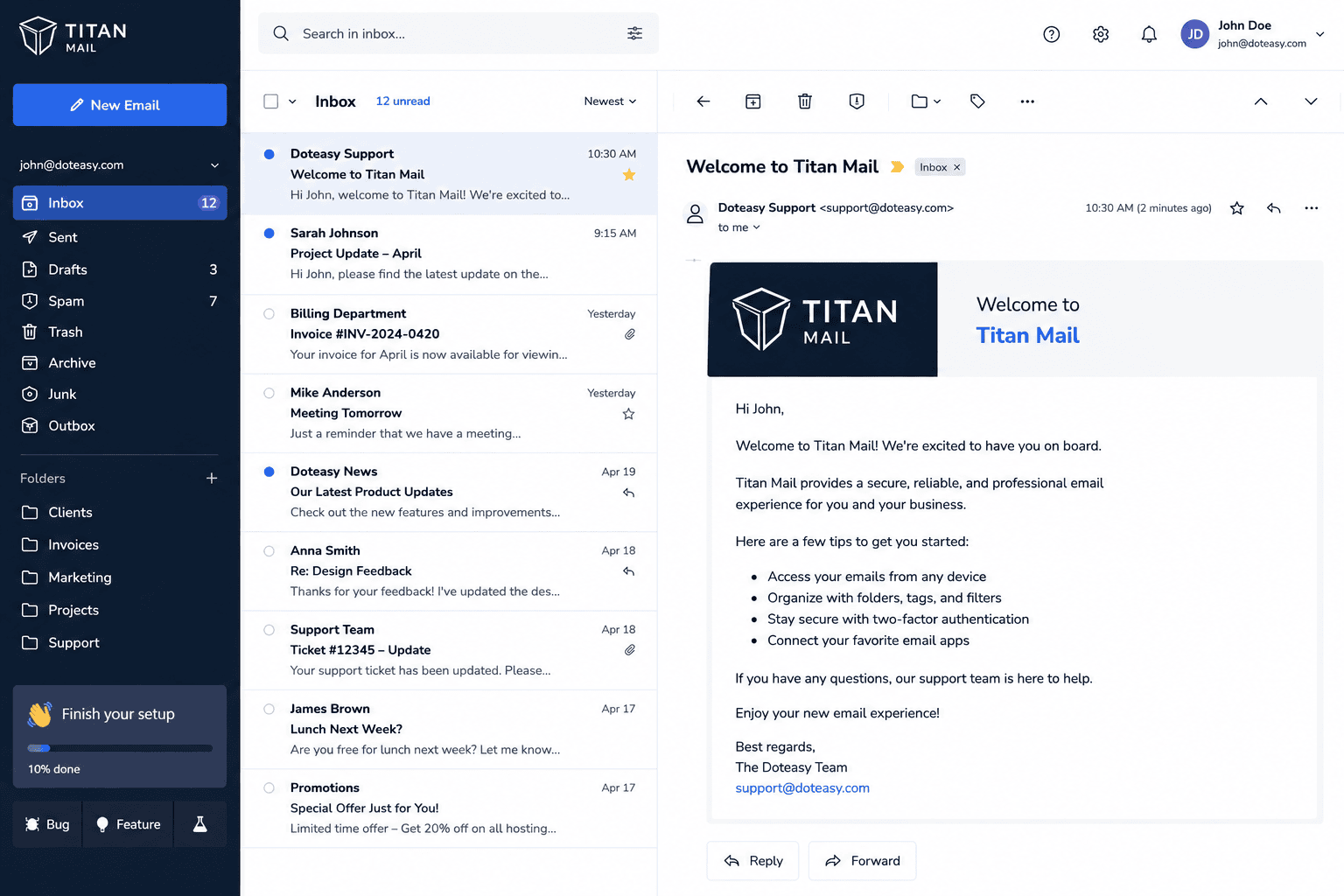
Titan Webmail lets you access your email from anywhere without installing any software.
After signing in, you'll find a familiar interface that makes it easy to:
- Read and reply to emails
- Compose new messages
- Forward or archive emails
- Organize messages into folders
- Search for specific emails
- Mark spam or unwanted messages
- Manage drafts and sent items
The navigation menu gives you quick access to all of your mail folders, while the search bar helps you locate messages quickly - even within large mailboxes.
If you've previously used another webmail platform, you'll find Titan's interface intuitive and easy to navigate.
Managing Your Titan Email Accounts
All email account management is performed through your Doteasy Customer Dashboard.
From there, you can create new mailboxes, manage existing users, reset passwords, and configure advanced email settings.
Creating a new email account
To create a new mailbox:
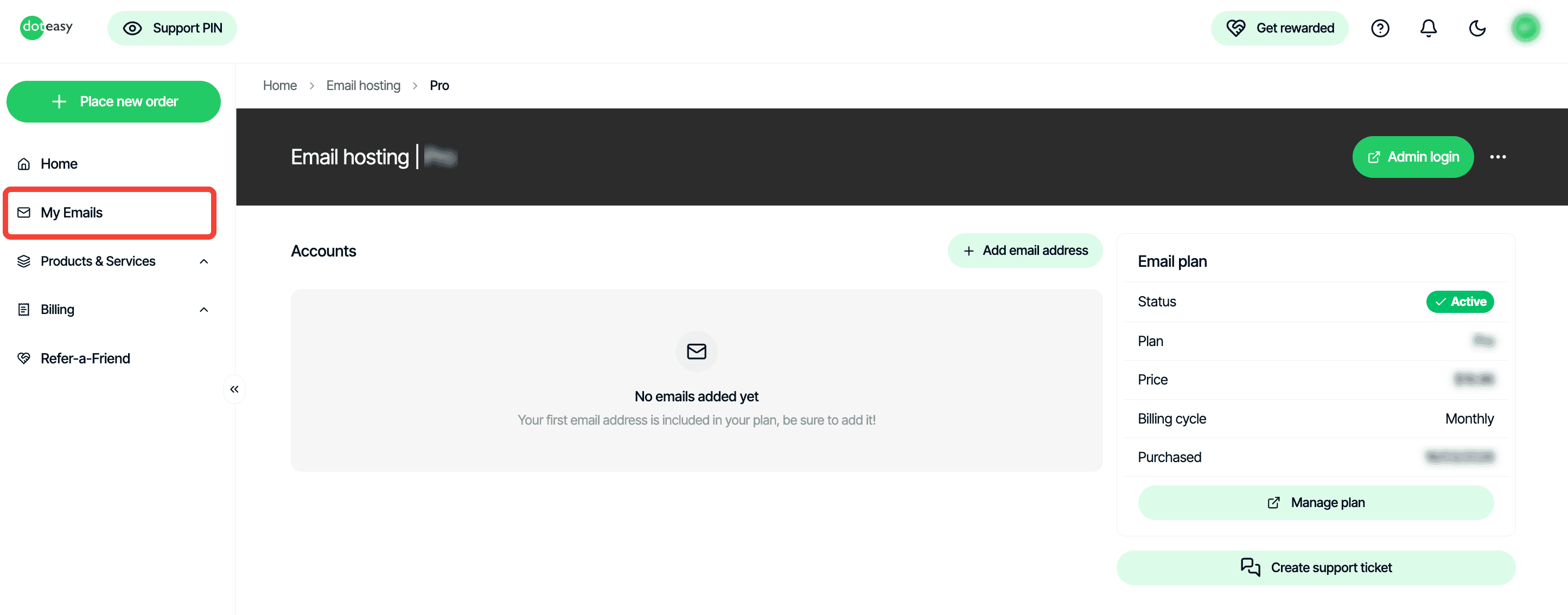
- Sign in to your Doteasy Customer Dashboard.
- Go to My Emails
- Click on Manage
- Choose Add email address
- Enter the new email address and password.
- Save your changes.
Your new mailbox will be available immediately.
Resetting an email password
If you've forgotten your password or simply want to update it:
- Open the Email section in your Customer Dashboard.
- Select the email account and click on the three dots.
- Choose Reset Password
- Enter your new password.
- Save your changes.
If you use Outlook, Apple Mail, Thunderbird, or a mobile email application, remember to update the saved password there as well.
Additional email management options
Titan also lets you:
- Configure email forwarding
- Create catch-all addresses
- Manage mailbox administrators
- Review mailbox storage usage
These tools make it easy to manage one mailbox or an entire organization's email accounts from a single location.
Using Titan with Your Favorite Email Application
While Titan includes an excellent webmail experience, many users prefer working from desktop or mobile email applications.
Titan supports standard IMAP, POP, and SMTP, allowing you to connect with popular applications including:
- Microsoft Outlook
- Mozilla Thunderbird
- Apple Mail
- Windows Mail
- Mobile email applications for iPhone and Android
Improve Email Deliverability with DKIM
If you send email using your own domain, enabling DKIM (DomainKeys Identified Mail) is strongly recommended.
DKIM adds a digital signature to every outgoing email, allowing receiving mail servers to verify that your messages are authentic and haven't been modified during transmission.
Benefits of enabling DKIM include:
- Better email deliverability
- Improved sender reputation
- Reduced likelihood of messages being marked as spam
- Increased trust with recipients
To enable DKIM:
- Sign in to your Doteasy Customer Dashboard.
- Navigate to My Emails
- Click on Manage for the domain name you would like to set DKIM record
- Click on Admin Login
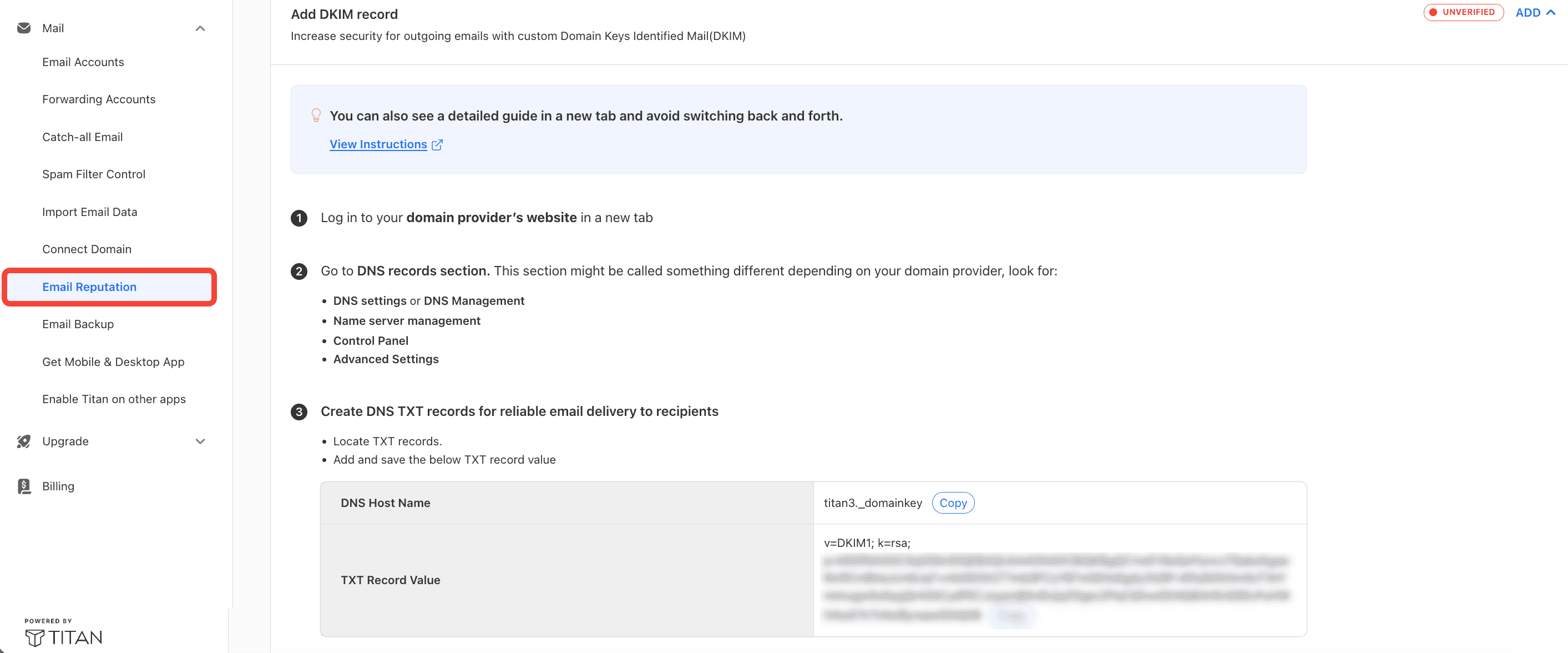
- Go to Email Reputation
- Click on Add to reveil your DKIM record
- Add the records to your active DNS zone then return to the dashboard and verify that DKIM is active.
DNS updates may take some time to propagate across the internet before verification succeeds.
Protect Your Email with Two-Factor Authentication
Your email account often contains sensitive personal and business information, making it one of the most important accounts to protect.
Titan supports Two-Factor Authentication (2FA), which adds an additional layer of security by requiring both your password and a verification code generated by an authenticator app.
Even if someone obtains your password, they won't be able to access your account without your authentication code.
To enable Two-Factor Authentication:
- Sign in to Titan Webmail
- Open Settings.
- Select Preferences.
- Choose Enable Two-Factor Authentication.
- Scan the QR code using an authenticator application such as Google Authenticator or Microsoft Authenticator.
- Enter the verification code to complete setup.
- Save your recovery codes in a secure location.
We highly recommend enabling 2FA as soon as you begin using Titan.
Frequently Asked Questions
- Will I still be able to use Outlook or Apple Mail?
Yes. Titan supports IMAP, POP, and SMTP, allowing you to continue using most desktop and mobile email applications.
- Can I continue using Webmail?
Yes. Titan includes a modern webmail interface that allows you to securely access your email from any supported web browser.
- Should I enable Two-Factor Authentication?
Absolutely. Two-Factor Authentication significantly improves account security and is one of the best ways to protect your email from unauthorized access.
- What is DKIM, and do I need it?
If you send email using your own domain, enabling DKIM is highly recommended. It helps receiving mail servers verify your messages, improving deliverability and reducing the chance of legitimate emails being flagged as spam.
- Can I manage multiple email accounts?
Yes. Your Doteasy Customer Dashboard allows you to create and manage multiple Titan email accounts, reset passwords, configure forwarding, and administer your email settings from one location.